Agentic Mobile Testing With e2e and agent-device
See how e2e uses agent-device for AI-driven iOS and Android tests, combines exact assertions with agent actions, and replays cached steps without model calls.



An AI agent can navigate a mobile app from a plain-language goal. Ask it to "get the app to greet Grace," and it can find the name field, type "Grace," and tap the greeting button. Turning that into a reliable test means checking that the screen says "Hello, Grace!" and making repeated runs practical without calling a model for every interaction.
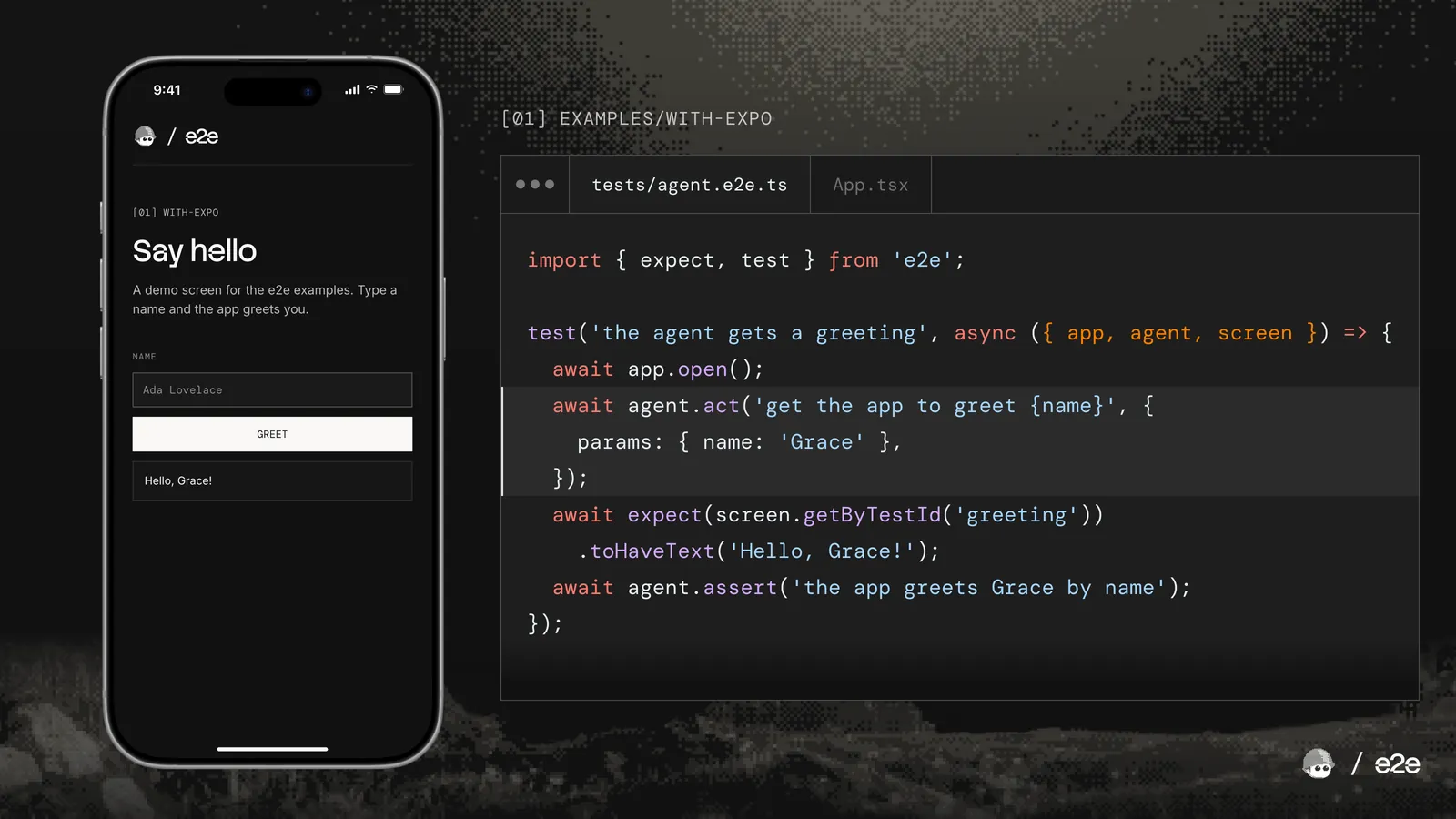
TesterArmy's open-source testing framework, e2e, combines goal-based agent actions with deterministic assertions and replay caching. The agent chooses the steps, exact assertions check the result, and subsequent cache hits replay the recorded actions without model calls for the cached step. Its web engine runs on Playwright. On iOS and Android, the mobile engine uses Callstack's agent-device to observe and interact with the app.
Let's follow a test for a React Native app built with Expo to see how these pieces work together.
Describe the goal and check the result
Here's a test from the Expo example in the e2e repo:
import { expect, test } from "e2e";

test("the agent gets a greeting", async ({ app, agent, screen }) => {
  await app.open();

  await agent.act("get the app to greet {name}", { params: { name: "Grace" } });

  await expect(screen.getByTestId("greeting")).toHaveText("Hello, Grace!");
  await agent.assert("the app greets Grace by name");
});
The test combines four steps:
app.open()launches the app on the simulator deterministically, thenagent.acttakes over. You don't have to tell it which field to type into or which button to press. You just describe the goal, and the agent figures it out by itself.- After that, a regular locator checks the exact text on the screen, and
agent.assertasks a separate judge model to confirm the app actually greets Grace.
Use an agent to navigate a flow from a goal, and keep exact checks where you know what to expect.
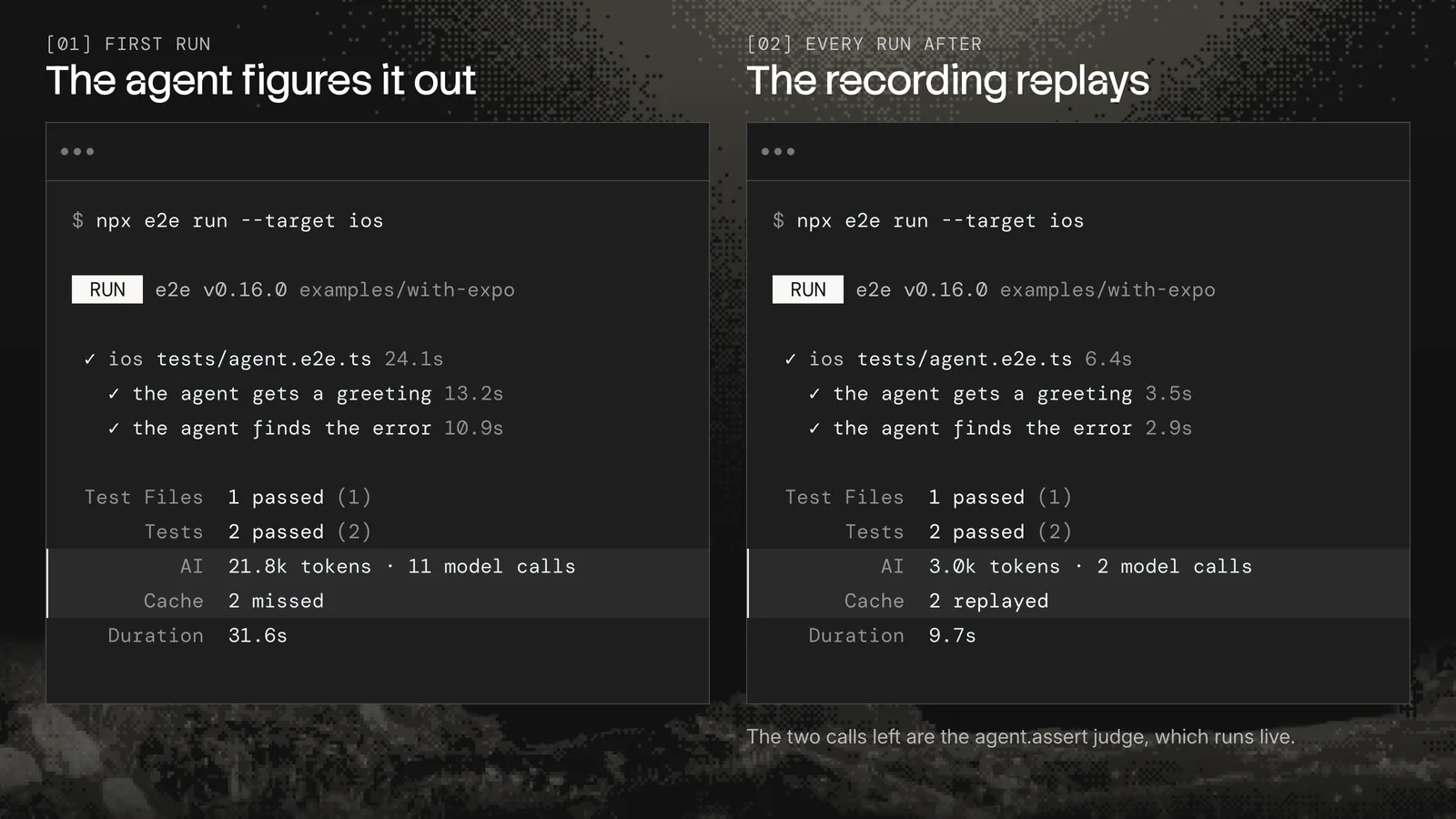
After a successful agent.act run and a confirming check, e2e saves the actions in its replay cache. Subsequent cache hits replay those actions deterministically, skipping inference for that step. If replay fails after the UI changes, the agent runs again and records a new path.
The agent runs on the model you configure: sign in with a subscription you already pay for, like ChatGPT or GitHub Copilot, or plug in an API key or even a local model.
The same test runs on web, iOS, and Android
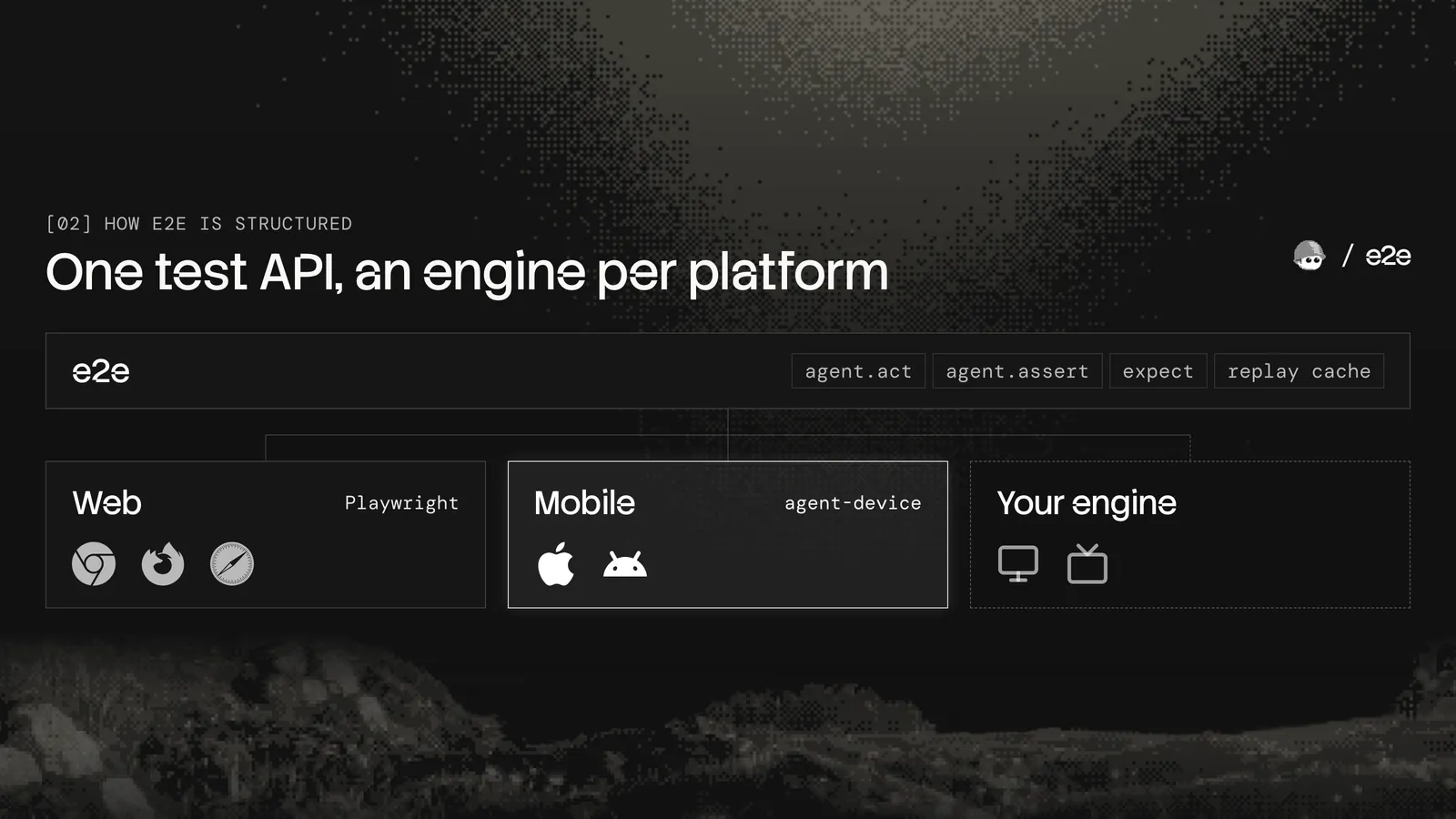
Under the hood, e2e doesn't talk directly to a browser or a phone. It talks to an engine, and the engine does all the platform-specific work. Out of the box, e2e supports two engines:
@e2e-dev/web, which runs on Playwright, so you get Chromium, Firefox, and WebKit.@e2e-dev/mobile, which runs on agent-device, Callstack's open source tool for controlling iOS simulators, Android emulators, and real phones.
The API between engines stays the same. agent, screen, expect, and the cache all work identically on every engine, so the test above works pretty much unchanged on the web build of the same Expo app (the example runs it on iOS, Android, and web). And if you want to test something else, like a desktop app, you can write your own engine with the same API the built-in ones use.
How agent-device drives the mobile engine
agent-device exposes the device interactions and observations a mobile testing agent needs. Alongside its CLI and Model Context Protocol (MCP) interfaces, it provides a typed Node.js client. The engine calls createAgentDeviceClient() to use it as a library. agent-device also supports the AI SDK, which e2e uses to run its agents.
Here's what the mobile engine gets from agent-device:
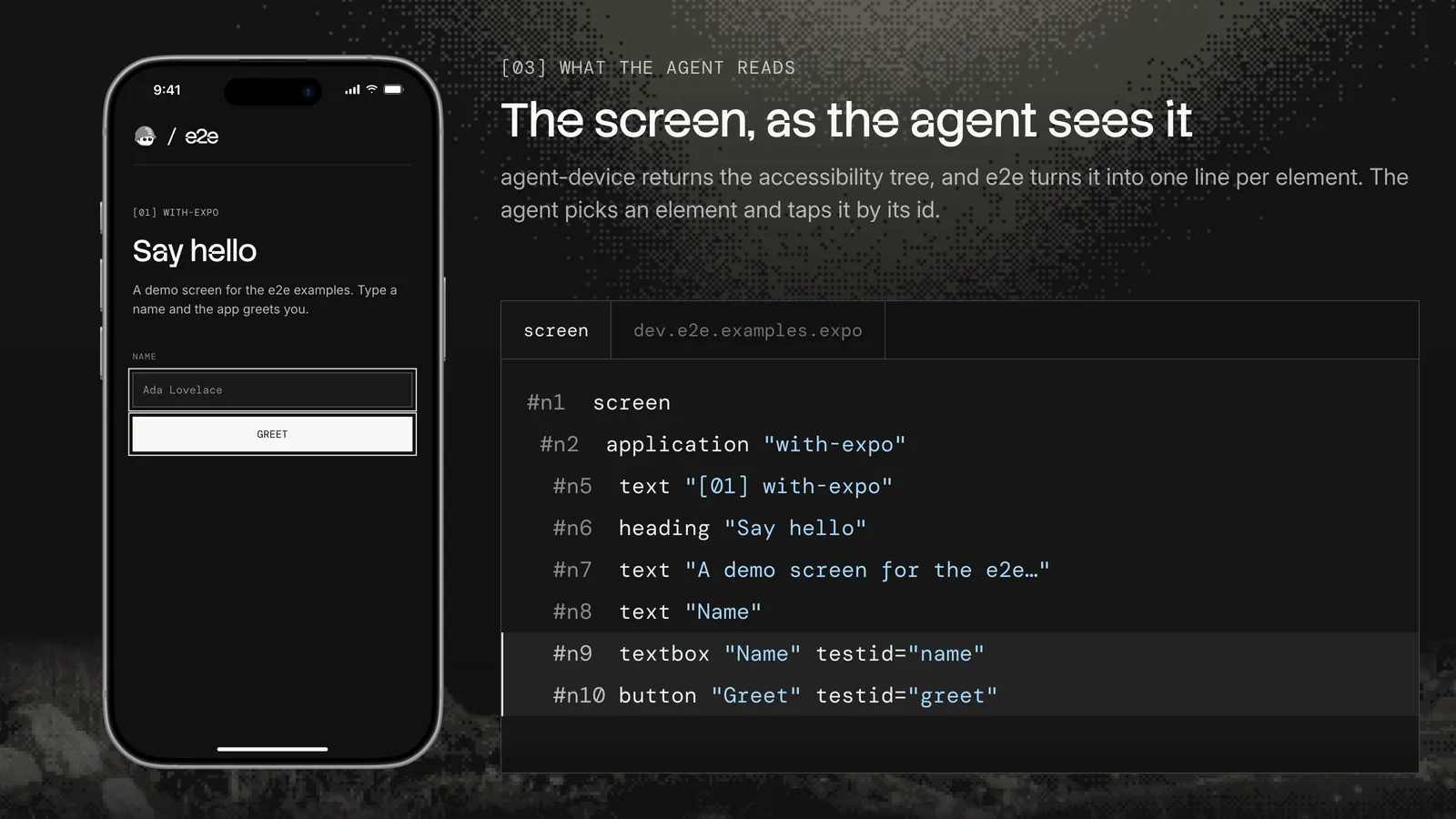
- Accessibility snapshots with refs the agent can target directly. Instead of guessing coordinates from a screenshot, the model reads that there's a textbox called "Name" and a button called "Greet", and taps them. That's faster, more precise, and uses way fewer tokens.
- Real interactions like taps, long presses, typing, scrolling, swipes, and system alerts, with an option to wait until the UI settles before the next step, which reduces model tool calls and time.
- Screenshots and video for the things the accessibility tree can't describe, like charts, photos, or an Apple Pay sheet, and for figuring out why a test failed.
- Device controls for the network, dark mode, permissions, location, and deep links, so a test can set up the exact state it needs without calling a model.
- Simulators, emulators, real phones, and device clouds. A phone plugged into your Mac works the same way as a simulator, and hosted devices like EAS Simulators connect through a remote agent-device daemon.
With all that in place, the mobile engine is mostly a translator. It does three things:
- First, it turns the snapshot into one shared syntax for both platforms. For example, an iOS text-field and an Android EditText both become a textbox.
- Then, it sends the action the agent chose back to agent-device.
- Last, it gives each worker its own session. This way, tests can run in parallel without fighting for the same device.
Thanks to Oskar, TesterArmy's CTO and the lead engineer behind e2e, for choosing agent-device as the mobile driver and contributing reliability fixes during early access. Those fixes improved the experience for users of both projects.
Cached actions skip the agent
Calling a model for every tap adds inference time and cost to continuous integration (CI) runs. e2e caches successful agent actions to avoid those calls on subsequent cache hits.
When an agent.act step passes and a check after it confirms the result, e2e records the actions the agent took. On a subsequent cache hit, it replays them directly without calling the model for that agent.act step. The only thing that still runs live is agent.assert, since its whole job is to look at the screen as it is right now.
On mobile, each recording is tied to the app's bundle ID and the screen it starts on, and every tap is saved as a description of the element (its role, name, and test ID) instead of coordinates. This way, a recording made on an iPhone 17 Pro still works on a different simulator, and if you commit the .e2e/cache folder, CI replays what you recorded on your machine. And when you redesign a screen, and the recorded button is gone, e2e hands that step back to the agent, which picks up from wherever the app is and records the new path.
Run your first mobile test
To get started, if you want to try it out locally, you'll need Xcode with an iOS simulator or the Android SDK with an emulator; in the cloud, you'll need access to EAS Simulator.
Then run these two commands in your project:
npx agent-device doctor
npx e2e init
The first one checks that your setup is ready. The second one starts e2e's installation wizard, so pick Mobile (iOS/Android) when it asks for an engine. It starts with the Settings app, so the example test passes right away, and you swap in your app's bundle ID when you're ready.
If you want to see a finished setup, the repo has example projects for Expo, SwiftUI, Jetpack Compose, Kotlin Multiplatform, and Flutter.
You'll find the example projects, setup guidance, and source code here:
Both projects are free and open source. If you found this useful, give them both a star on GitHub.